A Practical Data Backup Plan for Small Businesses
A practical small-business backup plan: inventory critical data, set recovery targets, keep protected copies, choose suitable tools and test restores.
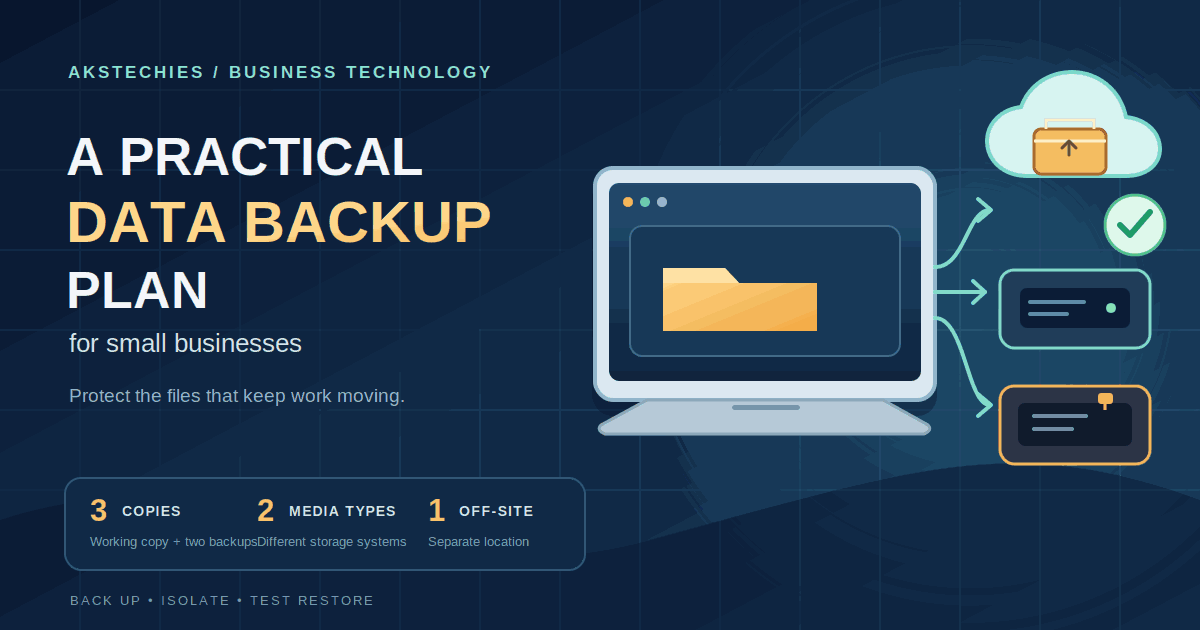
A small business can lose access to the information it needs in several ordinary ways: a laptop fails, someone deletes a shared folder, a cloud account is compromised, a supplier's system goes offline, or ransomware encrypts files. The damage is not limited to the files themselves. Orders, invoices, customer records, bookings and the steps employees use to serve customers may all stop moving.
A backup plan is useful only when it gives the business a realistic way to recover. A green “backup completed” message does not prove that the right data was copied, that an attacker cannot delete the copy, or that staff can restore it in time. This guide explains how to build a proportionate plan without buying an enterprise storage system.
1. Start by listing the information the business cannot afford to lose
Do not begin by comparing backup products. First identify the information that keeps the business operating and where it actually lives. A small company often has data spread across more places than its main office computer:
- Customer and sales records: enquiries, orders, contracts, appointments, CRM records and customer correspondence.
- Finance and administration: invoices, accounting exports, payroll records, tax documents, supplier details and insurance paperwork.
- Operations: inventory, product catalogues, job schedules, project files, point-of-sale exports and service records.
- Digital properties: website files, content, databases, product images, configuration files and records needed to restore the domain or hosting setup.
- People and devices: employee laptops, phones, shared folders and documents stored outside the main business drive.
For each item, record the system or device that holds it, who owns it, how often it changes, and how it could be exported or restored. Include cloud applications. NIST's storage guidance says a data-protection plan should cover relevant data assets wherever they reside, including on-premises and cloud environments; any deliberate exclusions should be documented and justified.
Prioritise by business impact, not file size. Record any data you deliberately exclude and why. Do not keep personal information indefinitely simply because storage is inexpensive; the FTC advises businesses to retain only what they need and protect what they keep.
2. Decide how much data loss and downtime are acceptable
Two simple questions help turn a vague backup requirement into a workable schedule:
- Recovery point objective (RPO): how much recent work could the business afford to lose, expressed as time? If the last usable copy is from yesterday morning, changes made after that point may have to be recreated.
- Recovery time objective (RTO): how long could the business operate without the system before the disruption becomes unacceptable?
These are planning targets, not promises from a backup vendor. Set them separately for different systems: a frequently updated order system may need more frequent copies than a folder of older marketing artwork. Write down the recovery order too, starting with the systems the business needs to serve customers and meet its obligations.
3. Use the 3-2-1 rule as a starting point, not a complete security plan
The 3-2-1 rule is a simple way to think about copies:
- 3 copies: keep the working copy plus two backup copies of important information.
- 2 types of storage: use different storage media or systems so one failure is less likely to affect every copy.
- 1 off-site copy: keep at least one copy away from the main premises or primary environment.
The former US-CERT, now part of CISA, describes this approach in its Data Backup Options paper. Treat it as a useful baseline rather than a certification or a guarantee. Three copies stored in the same room, on the same device, or behind the same administrator account can still fail together.
For ransomware resilience, add a copy that is isolated from ordinary day-to-day access. That may be a removable drive disconnected after the backup, or a cloud backup service with protected retention or immutability controls. The joint CISA, NSA and FBI #StopRansomware Guide recommends offline, encrypted backups of critical data and regular testing. It also warns that cloud-synced copies may be affected when encrypted local files are synchronised.
This is why file synchronisation and backup are not interchangeable. Sync is designed to keep locations aligned; a deletion or unwanted change may be copied to the other location. A backup should preserve recoverable versions and give the business a way to return to a known-good point.
4. Choose a mix of backup methods that matches the data
Most small businesses do not need one product to protect everything. A sensible setup may combine several approaches:
- Built-in device backup: useful for employee laptops and phones, provided the business can administer the account, recover the device and retain the data for long enough.
- Cloud backup: useful for off-site copies and businesses without a server room. Check upload speed, retention, restore fees, recovery limits and how the provider protects backups from deletion.
- External storage: can provide a straightforward local copy and a fast way to retrieve large files. It should be encrypted, stored securely and disconnected when not in use if it is intended to be an offline copy.
- Application-level exports or backup: important for accounting, CRM, booking, e-commerce and other hosted systems. Confirm what the service can export and whether a restore returns records, attachments, permissions and configuration—not just a spreadsheet of selected fields.
A provider's service resilience is not necessarily a separate backup you control. Check what happens after deletion, account compromise, subscription termination or a long outage. Recycle bins and version history may have limited retention or restore scope, so read the current documentation and test an export.
Compare total cost, not just storage price: subscriptions, capacity, retention, extra users, bandwidth, recovery or egress charges, hardware and staff time all matter. A managed provider can reduce the workload, but the business still needs an owner and independent restore tests.
5. Protect the backup copies themselves
A backup account can become a high-value target because it may contain a copy of the business's most important information. Apply controls that are separate from ordinary file sharing:
- Encrypt backup data in transit and at rest, especially when it contains customer, employee or financial information.
- Use multi-factor authentication for backup administration and restrict access to people who need it.
- Where possible, use separate administrator credentials for the backup system rather than reusing the credentials that control everyday devices or the main network.
- Enable immutable or deletion-protected retention where the service supports it, and alert an owner when retention, access or backup settings change.
- Keep encryption-key recovery information somewhere secure and separate from the backup itself. A backup that cannot be decrypted is not a usable recovery copy.
- For removable drives, label them, store them in a secure location away from the main device, and disconnect them after the backup if they are intended to be offline.
The UK's National Cyber Security Centre recommends isolating backups, separating credentials and preserving earlier versions. Its ransomware-resistant backup principles are useful when evaluating local or managed solutions.
6. Set backup frequency and retention deliberately
Choose frequency from the RPO, not a vendor default. If losing a full day of new orders would be unacceptable, a daily copy may not be enough. Less frequently changing, replaceable data may need a different schedule. Automation is generally more dependable than relying on someone to remember a manual copy.
Retention answers a different question: how far back can the business go? Keep enough history to recover from an error or compromise that was not noticed immediately. A policy that preserves only the latest copy can preserve the damaged version too. Time-based retention and version history can provide a way back to an earlier clean state.
Retention is not a reason to keep every record forever. Align it with business needs, contracts, privacy and record-keeping rules, and storage cost. NIST SP 800-209 recommends specifying copy frequency, retention, media, encryption and restore procedures, then monitoring backup execution.
7. Test restores, not just backup jobs
A successful backup job proves that a process ran. It does not prove that the files are complete, readable or recoverable with the credentials and software available to the business. Make restoration part of the routine:
- Restore a sample: choose a recent invoice, customer document and operational file. Restore them to a safe location and open them.
- Check application data: use a test environment or vendor-supported restore process to confirm that important records, attachments and relationships are usable.
- Run a larger recovery exercise: practise rebuilding a critical device, website or application without overwriting the live system.
- Time the work: record how long it took to locate the copy, obtain access, restore the data and confirm it is correct. Compare the result with the RTO.
- Record the outcome: note what was tested, the recovery point, who performed it, what failed and who owns the fix.
For critical data, NIST SP 800-209 recommends periodic integrity and restore tests at least monthly, with end-to-end exercises where recovery speed matters. A small business can start with a monthly sample restore and schedule larger tests based on risk. Treat a failed test as an operational issue to fix.
8. Questions to ask a backup provider
Before signing a contract, ask the provider to demonstrate the recovery process and answer these questions in writing:
- Which devices, cloud applications and file types are covered, and what is excluded?
- How often are copies created, how long are versions retained, and can you set the schedule?
- Are backups encrypted, isolated from everyday accounts and protected against unauthorised deletion?
- What RPO and RTO can the provider support, and what assumptions or extra fees apply?
- Can you restore individual files, accounts, devices and applications? Where is data stored, and how do you export it when the contract ends?
- How are failed jobs or unusual deletion attempts reported, and can the provider demonstrate a restore test?
Be cautious of claims such as “unlimited backup” or “complete protection” without clear scope, retention, restore limits and support terms. The cheapest plan may be adequate for replaceable documents but unsuitable for the systems that keep orders or appointments moving.
A manageable 30-day starting plan
- Week 1 — inventory: list critical information, where it lives, who owns it and the business impact if it disappears. Set a first recovery priority and draft RPO/RTO targets.
- Week 2 — configure: choose the appropriate backup method for each system, set schedules and retention, enable encryption and MFA, and separate backup administration from ordinary user access.
- Week 3 — restore: retrieve sample files and test one important application or device in a safe environment. Record the time and fix missing access, data or instructions.
- Week 4 — make it routine: name a backup owner and a deputy, document provider contacts and recovery steps, enable failure alerts, and put recurring restore tests on the calendar.
What to measure
Keep a short monthly record of critical systems covered, last successful backup time, unresolved backup alerts, age of the oldest available restore point, last successful restore test and actual recovery time. These measures are more useful than counting gigabytes stored. They show whether the business can recover the information it needs within the time it has allowed.
Conclusion
A practical backup plan is not defined by the number of cloud subscriptions or the size of an external drive. It starts with knowing which information matters, deciding how much loss and downtime are acceptable, keeping independent and protected copies, and proving that restoration works.
Start with the systems that would stop the business from serving customers or meeting its obligations. Assign an owner, automate the copies, protect the backup accounts and test a restore. A small, documented plan that is checked regularly is more useful than a complex setup nobody has tried to recover from.
Further reading
- CISA / US-CERT: Data Backup Options
- CISA, NSA, FBI and MS-ISAC: #StopRansomware Guide
- NIST SP 800-209: Security Guidelines for Storage Infrastructure
- FTC: Cybersecurity for Small Business
- NIST: Cybersecurity Framework 2.0 Small Business Quick-Start Guide
- Canadian Centre for Cyber Security: Back up and encrypt data
- UK NCSC: Ransomware-resistant backups
Related articles

Google Business Profile for Small Businesses: A Practical Local SEO Guide
A practical guide to setting up and maintaining a Google Business Profile: eligibility, categories, addresses and service areas, reviews, photos, local ranking factors and performance checks.
Read article
Website Accessibility for Small Businesses: A Practical WCAG 2.2 Checklist
A practical guide to making a small-business website easier to use with a keyboard, screen reader, touch controls and assistive technology—without starting with a costly redesign.
Read article
Why Business Emails Land in Spam: A Practical SPF, DKIM and DMARC Guide
Learn how small businesses can improve email deliverability with SPF, DKIM, DMARC, one-click unsubscribe, list hygiene and practical monitoring.
Read articleLet's talk
Have an idea? Let's figure out how to build it.
You don't need a technical specification or a perfectly defined plan. Tell us what you're trying to achieve, and we'll help identify the next steps.